
Prepare Your Shares for Trading
Ionic Digital has filed its Form S-1 registration statement with the U.S. Securities and Exchange Commission in preparation for a proposed direct listing of its Class A common stock on the Nasdaq Global Select Market, under the ticker symbol IOND.
If you want the ability to trade your shares once trading begins, you must take action. Your shares are currently held on the books of Ionic Digital’s transfer agent, Odyssey Transfer and Trust Company — they cannot be traded from there. Getting trade-ready is a two-step process, and Step 1 is something you can do right now.
Your Shares Cannot Be Traded Until You Move Them
Following the direct listing, Ionic Digital’s Class A common stock is expected to trade on Nasdaq. However, before your shares can be traded, they must first be transferred from Odyssey into a brokerage account with a broker that is a DTC participant and supports Direct Registration System (DRS) transfers. Before initiating the transfer, make sure your Odyssey account is registered, accurate, and ready.
Trading is expected to commence approximately 5 to 10 business days after the SEC declares the S-1 effective. That window exists specifically so shareholders can move their shares from the transfer agent into their brokerage accounts. Shareholders who prepare now will be in the best position to trade when the market opens.
Important: Neither Ionic Digital nor Odyssey can move shares for you. Only your broker can initiate the transfer — and only if your account information is in order.
Already Have a Brokerage Account? Confirm your broker supports DRS transfers and Register with Odyssey.
Your shares don’t live at your brokerage – they are held on the books of the transfer agent. A brokerage account that is a Depository Trust Company (DTC) participant that supports transfers through the Direct Registration System (DRS) is where your shares are going.
Don’t Have a Brokerage Account? You Don’t Have to Wait.
You do not need to wait for the S-1 to become effective to open a brokerage account. Only the share transfer itself must wait. Both preparation steps — registering with Odyssey and opening an account with a broker that is a DTC participant — can and should be completed now.
If you wish to sell your shares on the first day of trading, consider having your brokerage account set up in advance. The transfer window between S-1 effectiveness and the first day of trading is short, transfers take 1–2 business days, and common issues — name mismatches, missing tax IDs, delayed broker requests — take time to resolve. Shareholders who prepare both accounts ahead of time avoid these snags entirely.
Step 1
Register Your Shares — Do This Now
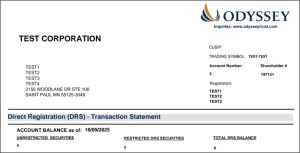
Create your online account with Odyssey Transfer and Trust Company, Ionic Digital’s transfer agent. This gives you access to your book-entry statement, which contains the account details your broker will need.
To register, visit ionicdigital.odysseytrust.com, select “Register,” and enter the Shareholder # and temporary password from your Odyssey email. If you can’t locate that email, contact Odyssey at ionicdigital@odysseytrust.com to receive your Shareholder #.
Once registered, confirm three things:
1. Your login works properly (if you already have an account, log in and check for access issues)
2. Your tax ID is on file with Odyssey
3. The name and tax ID on your Odyssey account exactly match your brokerage account
Mismatched names and tax IDs are the most common reasons share transfers fail. Getting this right now prevents delays later.
How to Register Your Shares With Odyssey
Step 2
Open Your Brokerage Account – Do this Now Unless You Already Have a Brokerage Account
You do not need to wait for the S-1 to become effective to open a brokerage account. In fact, we encourage you to prepare now by registering with Odyssey and opening an account with a broker that is a DTC participant and supports DRS transfers. Once the S-1 is effective, you’ll be ready to initiate your share transfer.
Examples of brokers: Fidelity, Charles Schwab, Vanguard, Interactive Brokers, Robinhood, and Coinbase.
The brokerage firms listed above are provided as examples for reference only and do not constitute an endorsement or recommendation by Ionic Digital. This list is not exhaustive, and Ionic Digital has no affiliation with or financial interest in any of the firms listed. Shareholders are responsible for confirming that their selected broker is a Depository Trust Company (DTC) participant and supports Direct Registration System (DRS) transfers before opening an account or initiating a transfer.
Step 3
Transfer Your Shares To Your Brokerage Account
You can direct your broker to transfer your shares from Odyssey into your brokerage account. Your broker must be a DTC participant in the U.S.
You’ll know the S-1 is effective when Ionic Digital issues a press release announcing it. If your Odyssey account is registered with an email address, Odyssey will also email you directly — one more reason to complete Step 1 now.
Transfers are completed by your broker through the Direct Registration System (DRS), typically within 1–2 business days. If you’d like the option to sell on the first day of public trading, coordinate this transfer with your broker as soon as possible after the S-1 becomes effective.
Your shares and the direct listing - what to know
FAQ for Stockholders of Ionic Digital Inc.
In advance of the direct listing, it is critical that you create an account online with our transfer agent, Odyssey Transfer and Trust Company (“Odyssey”). This will allow you to get book-entry statements with your share information. This will allow your broker to assist you. If you have already created an account, we recommend that you confirm your login information functions properly.
Go to ionicdigital.odysseytrust.com and choose “Register.” When registering your account online, please enter the following information:
- Shareholder #: Enter the shareholder number provided in your email from Odyssey, and
- Password: Enter the temporary password provided in your email from Odyssey.
Click “Register,” then follow the instructions to complete your registration:
- Enter and confirm your New Password,
- Enter and confirm your New Username,
- Enter your preferred email and phone number (select the appropriate country code),
- Update your security questions, and
- Click Submit
Our transfer agent is Odyssey Transfer and Trust Company. Odyssey can be contacted:
By Website: odysseytrust.com/us/contact-us
By Email: ionicdigital@odysseytrust.com
By Phone: Monday through Friday, 9:00 a.m. to 10:00 p.m. Eastern Time.
US & Canada (toll-free) 833-814-9451
Direct Dial (all regions) 973-528-7005
By Mail: Odyssey Transfer and Trust Company, 860 Blue Gentian Rd, Suite 320, Eagan, MN 55121
You can access your account and download statements at ionicdigital.odysseytrust.com. For any additional information please contact our transfer agent, Odyssey.
If you are unable to remember your username or password, please click on the “Forgot Username/Password?” link below the “Sign On” section. Once your username or email address has been entered, an email will be sent to you containing your username and a link to reset your password.
Ionic will issue a press release to announce that the S-1 has been declared effective. In addition, Odyssey will email you if you have registered your account with an email address to alert you that the S-1 is effective.
a. Contact your broker (must be a DTC participant) and provide:
i. Your Odyssey account number,
ii. Your exact Odyssey account name,
iii. Your tax ID number (if there is no tax ID on file, the broker should enter all 1s for U.S. holders and all 9s for holders outside the U.S.),
iv. The number of shares you would like to transfer, and
v. The CUSIP number of Ionic Class A common stock: 462210 105.
b. Transfers are done by the broker through the Direct Registration System (“DRS”), typically within 1–2 business days.
i. Some brokers may allow for sales during pending transfers, please check with yours.
c. If a DRS request fails, your broker must resubmit it after correcting the issue.
d. Note: Neither the company nor Odyssey can move shares for you. It must be done by your broker.
e. Please see your statement for your Odyssey account number, registration name, CUSIP and share balance.
On the day that our shares are initially listed for trading on Nasdaq, Nasdaq, will begin accepting, but not executing, pre-opening buy and sell orders and Nasdaq will begin to continuously generate the indicative current reference price for our stock on the basis of such accepted orders.
During a 10-minute “Display Only” period, market participants may enter quotes and orders for our stock in Nasdaq’s systems and Nasdaq will disseminate such information, along with other indicative imbalance information, to J.P. Morgan and certain other market participants (including our other financial advisors) on Nasdaq’s NOII and BookViewer tools.
Following such 10-minute “Display Only” period, a “Pre-Launch” period will begin, during which J.P. Morgan, in its capacity as our designated financial advisor, must notify Nasdaq that our shares are “ready to trade.” Once J.P. Morgan has notified Nasdaq that our shares are ready to trade, Nasdaq will calculate the current reference price for our shares. If J.P. Morgan then approves proceeding at the current reference price, Nasdaq will conduct price validation checks.
Upon completion of such price validation checks, the applicable orders for our stock that have been entered will then be executed at such price and regular trading of our shares on Nasdaq will commence.
The company will not be involved in the price-setting process. J.P. Morgan will determine when our shares are ready to trade and approve proceeding at the current reference price primarily based on consideration of trading volume, timing and share price. In particular, J.P. Morgan will determine, based primarily on pre-opening buy and sell orders, when a reasonable amount of volume will cross on the opening trade such that sufficient price discovery has been made to open trading at the current reference price.
Further information on this process will be described in the registration statement.
The S-1 and our other SEC filings are publicly available on the SEC’s website at www.sec.gov.
Odyssey Transfer and Trust Company Ionic Digital’s Transfer Agent
Email: ionicdigital@odysseytrust.com
Phone: Monday–Friday, 9:00 a.m. to 10:00 p.m. ET
- US & Canada (toll-free): 833-814-9451
- Direct dial (all regions): 973-528-7005
Mail: Odyssey Transfer and Trust Company, 860 Blue Gentian Rd, Suite 320, Eagan, MN 55121
For full details, review the complete Shareholder FAQs and Ionic Digital’s SEC filings, publicly available at www.sec.gov.